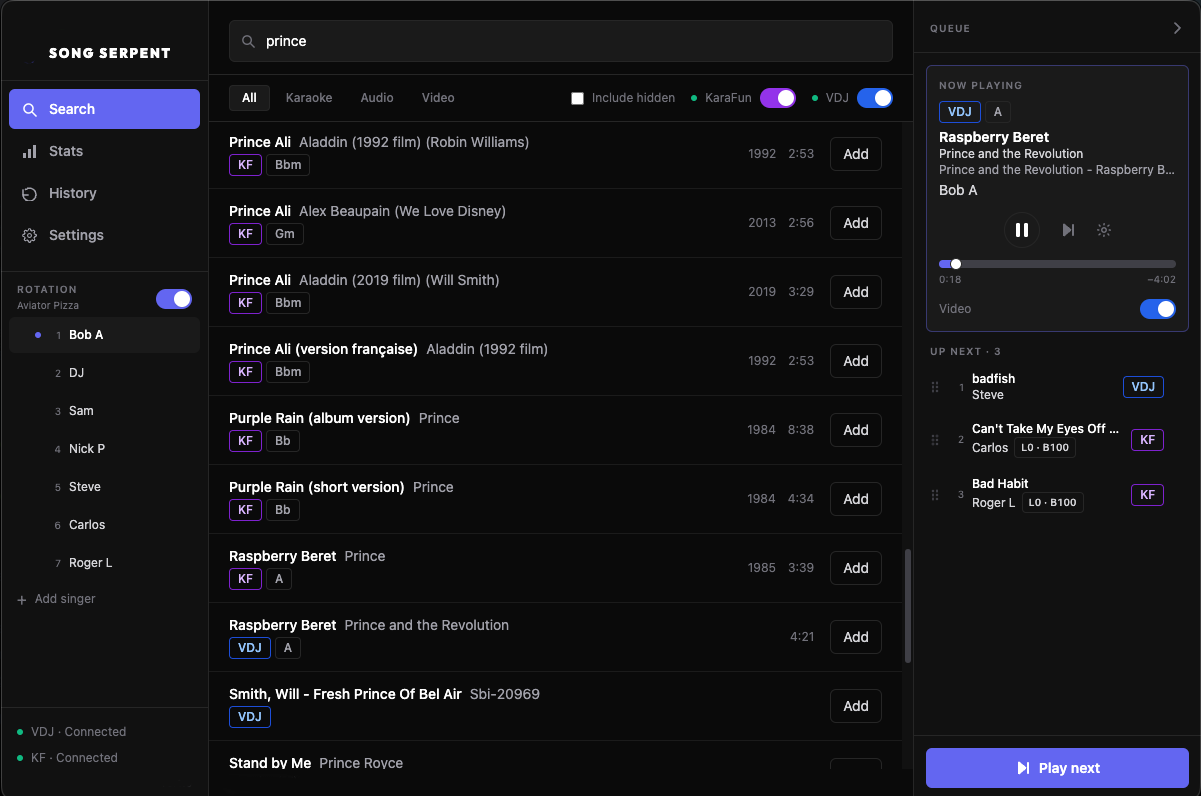
You installed Song Serpent plus KaraFun and/or VirtualDJ. Song Serpent is the host screen—search, queue, rotate singers, and change keys from one place. Your engines still play the audio.
Stop juggling engine windows. Song Serpent is the desk you host from — search, queue, rotate, and run the room while KaraFun and VirtualDJ keep playing the audio.
One lineup, both engines
Requests land in a single host queue. When a track is up, Song Serpent hands it to the right engine so you’re watching the singers, not the taskbar.
Stay with the night
Keys, rotation, intermission, and Fangcast™ live on the same screen you already use to run the show.
System requirements
Song Serpent is a desktop host app. These are the floors we ship against today.
Windows 10 or later (64-bit Intel/AMD or ARM), or macOS 10.15 Catalina or later (Intel or Apple Silicon). Linux desktop builds are not offered.
Host window at least 900×600.
Fangcast™ requires dual display — one screen for the host app, a second for the audience overlay (QR, vibes, end-of-song tallies).
Internet for sign-in, license checks, and Fangcast™. Engines talk over your local network as described below.
Connect once, then never leave
Wire VirtualDJ and KaraFun in Settings first. Song Serpent doesn’t replace those subscriptions — it searches the catalogs you already pay for and adds picks to one host queue. The engines still play the audio.
VirtualDJ Pro
VirtualDJ Pro plus the Network Control plugin so Song Serpent can drive VirtualDJ over HTTP.
In VirtualDJ, open Config → Extensions, install Network Control (Effects → Other).
On the Master panel, set Network Control under Auto-Start Master Effects, then open its settings (cog).
Set the HTTP port (Song Serpent defaults to 8080 — match whatever you configure) and optional authentication password.
In Song Serpent → Settings → VirtualDJ, enter host (usually 127.0.0.1), the same port and password, then Connect.
Match host, port, and password to your Network Control plugin settings.
Song Serpent shows and hides the VirtualDJ video window for you — no hand-toggling when KaraFun takes the floor.
KaraFun
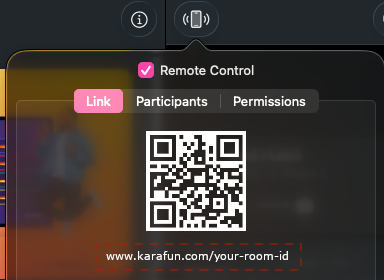
An active KaraFun subscription with remote control on. Paste the room URL or code into Song Serpent; playback audio stays on the KaraFun host.
In KaraFun, enable Remote Control, open the Link tab, then copy the room URL into Song Serpent.
Song Serpent → Settings → enable each engine, Connect, then you’re ready to search.
Search once. Queue once.
Type a song. See KaraFun and VirtualDJ together. Add it to the shared lineup and Song Serpent sends it to the right engine when that singer is up.
Both catalogs, one list
Results show title, artist, and which engine has the track. Pick a row, pick a singer, and it’s on the host queue — not buried in a second window.
Video that follows the engine
Song Serpent auto-manages the VirtualDJ video window — closes it when KaraFun plays, opens it again for VirtualDJ tracks (Settings → VirtualDJ → Video auto-manage).
Search results list both engines — add any row to the same host queue.
Fair turns — until you grab the wheel
Keep a singer list on the side. Smart rotation places new songs so walk-ups get a turn without cutting the line. Override anytime a VIP, duet, or fixed order walks up.
Smart rotation
Leave it on and Song Serpent places requests so everyone gets a fair turn without you reshuffling every time.
Next rotation — one song per singer per round; new requests join after people already waiting.
End of rotation — drop that singer to the bottom of the list, then place with fair turns (great for a first song).
Fair turns (round robin) spreads songs across singers; stack keeps one singer’s songs together.
Auto-manage rotation — as songs finish, keep the queue aligned with your policy.
Manual control
Take the wheel when the room needs it — VIP walk-up, duet next, or a locked order for the hour.
End of queue — park the song at the bottom, ignoring rotation.
Play next / Add & play now — jump it to the front or start it immediately.
Drag songs in the queue to reorder by hand.
Resort to rotation — snap a manual drag back to the smart policy when you want fairness again.
When you add a song, Song Serpent suggests a smart position from Settings. Change it in the add dialog for that song only.
Settings · Rotation
Enable rotation
Use rotation placement when adding songs
End of rotation
For new singers / first song. End of rotation also moves them to the bottom of the singer list.
Fair turns (round robin)
Fair turns spreads songs across singers; stack keeps a singer’s songs together.
Auto-manage rotation
Keep queue order in sync with rotation as singers play
Rotation controls from the Song Serpent desktop Settings.
Key and tempo without leaving the desk
Transpose KaraFun and VirtualDJ from Song Serpent — no diving into each engine mid-request.
Set it when you add
Open Advanced on add to set key and tempo. KaraFun also exposes lead/backing vocal levels.
Fix it before they walk up
Edit a queued song anytime before it plays to change key or tempo.
Nudge it live
On the now-playing song, Adjust key / tempo changes pitch while they’re already on stage.
Fangcast™
Pro
Phones up. The crowd talks to the singer. Guests scan a QR and tap Love and Hype — and Roast when you flip Roast mode on — and those reactions blast onto the singer display with live tallies while the song is still going. No app install. No guest accounts.
Get every phone in the room
Share a QR or short link from Settings → Fangcast™. Guests open it in the browser and they’re live. Add tip links (Venmo, PayPal, Cash App…) and socials when you want the guest page to work the room for you.
Vibes only while the track plays
One vibe per device per song — only while audio is actually playing. Pause or between songs, they wait instead of staring at a dead title. Front-row devices unlock mystery and bank a 1UP for a second vibe later.
Roast mode when you want bite
Flip Roast on and guests get Down, Laugh, Tomato, and Rage next to Love and Hype. Nice vs roast tug-of-war can wash the display in Fire or Tomato — mutually exclusive, and you can force either from the KJ toolkit.
The big screen goes loud
Reactions fly across the singer display as they land. Hit celebration thresholds (5 / 15 / 30 by default) and that emoji bursts big. You set the thresholds; the room supplies the noise.
KJ toolkit without leaving the queue
Open a Cheer window so the room can spam reactions for a few seconds, Boost a singer, light Fire or Tomato, show or hide the QR, unlock mystery for the whole room — all from the queue player while the song is still going.
Crown the night
Net reaction scores pile up so you can crown Song of the Night and run a recap when the last singer sits down. Device counts show phones in the room — never names.
Privacy stays boring on purpose — no guest names, anonymous device ids hashed on our servers, one vibe per browser per song. Private windows can watch but cannot vibe. See the Privacy Policy.
Fangcast™ is a Pro feature.
Fill the gaps without a second playlist
Pro
Drop non-karaoke tracks between singers in the same queue. The room stays loud; you stay in Song Serpent.
Intermission in the lineup
Park DJ / walk-in music between karaoke songs so you’re not flipping to another app when the next singer isn’t ready.
Intermission tracks in the queue are a Pro feature.
Remember the night
When the last singer sits down, you’ve still got the record — not just a cleared queue.
History
What played tonight (singer, song, engine), with CSV export when you need a report.
Stats
Top songs and singers, plus KaraFun vs VirtualDJ breakdown, for tonight, this week, or all time.
Host your next night with Song Serpent
Create a free account, connect your engines, and unlock Pro when you need the singer cap gone.
 Song Serpent